Showing posts with label workshops. Show all posts

Sunday, 10 August 2014

#edchatNZ Blogging Meme

Term three has had a busy start for me with the first three Saturdays consumed with connecting face to face with my online PLN at #educampAKLD, #educampTT and the inaugural #edchatNZ conference.  I was waiting for the end of this third event to write a post and was procrastinating, however thanks to being challenged by Bridget Casse to participate in the #edchatNZ meme I am prompted to waste no more time!
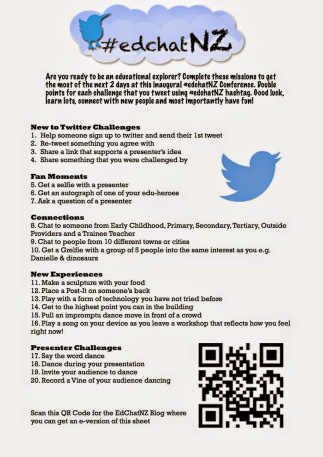
If you get included in the blogging meme: copy/paste the questions and instructions into your own blog then fill out your own answers. Share on twitter tagging 5 friends.

1. How did you attend the #Edchatnz Conference? (Face 2 Face, followed online or didn't)I was lucky enough to attend BOTH days Face 2 Face

2. How many others attended from your school or organisation?I was flying SOLO at this one however I got to carpool both days with @Mrs_Hyde, @Carobush and @annagerrit which made the trip to the other side of town a lot of fun and giggles.

3.How many #Edchatnz challenges did you complete?I got several Grelfies done over the two days, this really cheezy one first thing on arrival on Friday with Annemarie, Caroline and Diana...


and this Geeky (I say Gorgeous) Glasses Grelfie on Saturday with Bridget Casse @bridgetcasse and Phillipa @AKeenReader


I also love this one with two people that I admire greatly Annemarie and Mark


*Plus I did get people up and dancing in the very first session with Andrew Cowie (thanks to the assistance of Annemarie) video evidenced here: http://youtu.be/JMUha6UiaKc which scored me this wonderful conference prize of a Samsung Galaxy Gear (great because I'm a Samsung S4 user & Android fan)


4. Who are 3 people that you connected with and what did you learn from them?Amy McCauley - Google Sites session: subscribing to changes & making a filter in Gmail in box to sort theseAndrew Cowie - Ghostery.com an app to show what other sites are tracking your movements onlineReid Walker - the joy of seeing a tweep having "aha" moments at Pam Hook's session for primary teachers on Solo Taxonmy

5. What session are you gutted that you missed?Modern Learning Environments with Mark Osborne.  

6. Who is one person that you would like to have taken to Edchatnz and what key thing would they have learned? 
I would of loved it if Tana Klaricich could of been there in person but I know she was following via our twitter updates. 

7. Is there a person you didn’t get to meet/chat with (F2F/online) that you wished you had? WhyI wanted to make a connection with Karla Hull from Ngatea School.  I've been connecting with her a few times recently on twitter and she wasn't able to attend in the end.  I like what I've read via twitter and the blogs coming out of Ngatea School on transforming learning spaces.

8. What is the next book you are going to read and why? Alan November "Who owns the learning?" suggested this week to me twice and it's under $20 on Book Depository http://goo.gl/k7hDSj It is about students using technology to drive their learning.

9. What is one thing you plan to do to continue the Education Revolution you learnt about at #EdchatNZ?
It's ok to be a lone nut, but having a mixed group of nuts is better - variety is the spice of life - seek out the nut in others to try something new.

10. Will you take a risk and hand your students a blank canvas?In my role as a DP our staff are my initial 'students' so giving out a blank canvas supported by 'paint by numbers' is more my style

Who do will I tag with this meme: Aimie Sibson https://twitter.com/Aimiesibson
Michelle Simms https://twitter.com/MSimmsNZ
Gosh the formatting in this post jumped all over the place!

Thursday, 12 February 2009

Techie-Breakie I - Reflection

Yesterday I took my first "Techie-Breakie" workshop for teachers. On my twitter the other day I got asked what one is; it simply is a short workshop/meeting before school to highlight ways in which the staff can use their laptops, class computers and web2.0 applications effectively.

I have planned to take these workshops weekly, running between 8.00-8.30am, however this first one went close to the school bell (which wasn't ideal, as teachers really should aim to be in their classes around 8.30am to ensure they are ready for the daily lessons ahead and building relationships with the children and parents that have arrived early at school).

The purpose of the first session was about using blogs because this year I have started three blogs for our three teams at school to share with the wider learning community successes and events of each team. The idea is that one class per week will be responsible for making a post of what they are learning in their class, or highlight an event. I am hoping that when staff see the power that an authentic audience has for student learning and how relatively easy it is to make a post, then they may feel encouraged to start their own individual class blogs. So a very brief post was made as an example to show the staff how to make a post.

I felt that I was well prepared, having made a wikipage of instructions and simple step by step handouts. It took a lot longer than expected as staff had not responded to an earlier email that was sent asking them to be a contributor/author to their team blog, along with a follow-up email that I had sent inviting them to come to the Techie-Breakie and to view the wikipage first. So the first session was spent mostly with setting up all the staff present with their Google Account, along with accepting their contributor/author invite for their team blog and then watching a demonstration of how I made the previous post and inserting an image.

How do I feel about this? Well I was actually quite pleased and went away from the session believing it was a success. It is only optional for staff to come to these workshops and out of 17 classrooms there were 11 teachers present, along with 2 student teachers, the other DP and our Principal; so 15 in total. I had a projector set up with my laptop so staff could see what steps to take, and a staff member who hadn't set up her accounts did it on my laptop for everyone to see, while I "coached" everyone else. I was able to go up to the screen and point out where they should be typing and working alongside staff that needed extra help. This was great for me, as a good coach should always be hands-off in my mind and the staff member should be doing! After the workshop was over, I made a follow-up email inviting all staff to go through the steps of what we did in the session by making a Google account, and accepting their invitation for the team blogs. I also encouraged the staff members present to go back and help our colleagues that did not come to coach them through this process.

The best warm fuzzy I got was when our assistant principal for the junior team later in the day made her first post to her team's blog. She inserted images all by herself and I coached her through using the Edit Html tabs to cut and paste the image to the correct position on the blog. I was really proud of her because she made a post with several images and text. I hope she now feels more confident using this feature and now she will be able to coach, lead and encourage the other staff in her team.

Where to next? Well my goal this term is for all teachers to make a post to their team blogs using simply text and images of an event in their classroom. From here I would like to introduce how to insert videos, slideshows, voicethread and moving images (like bubbleshare). At one of the next full staff meetings I need to recap internet safety with the staff and our responsibility to not break copyright by the correct attribution of sources.

photo credit: Beautiful Tools by Geishaboy500 http://www.flickr.com/photos/49503154413@N01/100043823