Showing posts with label getting connected. Show all posts

Saturday, 16 June 2018

TML Wk 29: Professional Online Social Networks

My post this week relates to Professional Online Social Networks. In response to this I will be reflecting on my own experiences as an early adopter of social media and the opportunities this has created for me professionally. I will discuss this considering Jay and Johnson's (2002) reflective model to unpack it. This takes the form of a three step reflection process that is descriptive, comparative and critical.

Descriptive
I consider myself to be a connected educator and early adopter of social media for professional use.  I have documented this journey, as evidenced in several blog posts and in particular this early one from 2009 on my top 3 tips for getting connected online.  In this post I suggest using "new" web 2.0 tools such as opening an RSS reader account, using social book marking (Delicious) and starting connections using Twitter! I also refer to my developing Professional Learning Network (a PLN) which back then was a very new term and predominately spread throughout New Zealand.  Now, some 10 years later, my PLN is global and these digital connections I can call upon because of the on-going nurturing of interactions via social media, making the vast physical distance of global connection virtual and compact in the palm of your hand (on your device).

Comparative
My experiences parallel the video produced from Office of Ed Tech (2013), shared for our week 29 course work which discusses how being connected is one of the number one tools for being a 21st Century Educator, the isolation of the classroom (or school environment) is no more through the magnification of the transformative power of professional learning via technology (social media).  At the time of writing this post their was limited responses in our cohort survey tool to compare.  What I can say from my own observation of being connected over the last decade is that the use of Facebook for professional social networking has increased with the use of "groups" and of interest over this time the development of #hashtags and frequency of #twitterchats to share professional knowledge.

Critical
As an advocate for using professional online social networks, I reflect back on this 2013 Ignite presentation that I shared in which I spoke about being connected, disconnected and reconnected.  

It takes a lot to nurture your online social media profile and connections. The rewards of doing so open a world of professional growth that I would have never had opened if it weren't for social media/technology. I would recommend that anyone wanting to start being a more connected educator to follow the simple "Follow 5, Find 5, Take 5" method suggested by Whitaker et al., (2015) as a way nurturing a PLN.  As an employer, being a connected educator is an important factor in considering whether a candidate is suitable and I do review the online presence of applicants.  One of the key points of difference I have in my tool belt when going for leadership roles (I believe) is that my employer knows that it isn't just my skills, and knowledge that they are employing, but that of my wider collective and connective PLN too, which I can access readily!  

Opportunities afforded to be by being connected (& associated blog links/video):


Word count: 649

References

Emerging Leaders, (2013) Ignite Talk by J. Driver. [video file].  Retrieved from https://vimeo.com/69428288

Driver, J (n.d). Blog posts retrieved from http://digitallearningnz.blogspot.com/

Jay, J.K. and Johnson, K.L. (2002). Capturing complexity: a typology of reflective practice for teacher education. Teaching and Teacher Education, 18, 73-85.
Office of Ed Tech. (2013, Sep 18). Connected Educators. [video file]. Retrieved from https://www.youtube.com/watch?t=216&v=K4Vd4JP_DB8
Whitaker, T., Zoul, J., & Casas, J. (2015). What connected educators do differently. New York, NY: Routledge.

Sunday, 28 February 2016

#Educamprotovegas

On Saturday 27th February at the crack of dawn I picked up +Fiona Grant and +Karen Ferguson to head south for a day of learning and connecting at #educamprotovegas held at Rotorua Girls High School.  We made it with time to spare and it was a great opportunity to see some of my awesome PLN face to face and meet new educators that I can now call upon.  The day started with a really informative smackdown - where participants had only 2 minutes maximum to share an idea, app or educational gem.


I shared in the smackdown about the +GEG NZ learning community and our upcoming GEGNZ Studygroups that will help educators in NZ attain level 1 in the new Google for Education certifications.
After the smackdown and lunch break we then had the opportunity to select two breakout sessions - I listened to +Steve Katene share the learning journey of Richmond School in Napier where he is DP for his learners and coaches (teachers) which was really inspiring! This guy has great energy and I'd love to take a visit to his school to see it in action.  I'm looking forward to revisiting his slide deck.
I was super pleased to meet my old student teacher and colleague +Robyn Keightley for her first Educamp.  She travelled over from Tauranga and ended up sharing twice in the smackdown and then led a breakout session on the 1:1 ipad journey her school had made.
Thanks to +Annemarie Hyde and +Marnel van der Spuy for being great hosts and organising this event! It was well worth the 450km round trip!
Here are the tweets from the session:

Sunday, 10 August 2014

#edchatNZ Blogging Meme

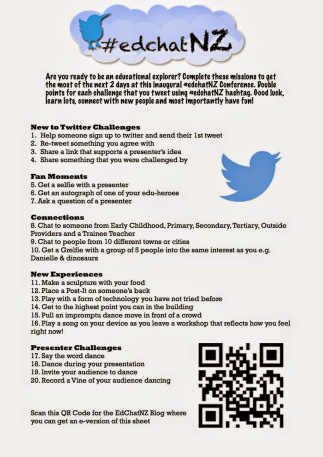
Term three has had a busy start for me with the first three Saturdays consumed with connecting face to face with my online PLN at #educampAKLD, #educampTT and the inaugural #edchatNZ conference.  I was waiting for the end of this third event to write a post and was procrastinating, however thanks to being challenged by Bridget Casse to participate in the #edchatNZ meme I am prompted to waste no more time!

If you get included in the blogging meme: copy/paste the questions and instructions into your own blog then fill out your own answers. Share on twitter tagging 5 friends.

1. How did you attend the #Edchatnz Conference? (Face 2 Face, followed online or didn't)I was lucky enough to attend BOTH days Face 2 Face

2. How many others attended from your school or organisation?I was flying SOLO at this one however I got to carpool both days with @Mrs_Hyde, @Carobush and @annagerrit which made the trip to the other side of town a lot of fun and giggles.

3.How many #Edchatnz challenges did you complete?I got several Grelfies done over the two days, this really cheezy one first thing on arrival on Friday with Annemarie, Caroline and Diana...


and this Geeky (I say Gorgeous) Glasses Grelfie on Saturday with Bridget Casse @bridgetcasse and Phillipa @AKeenReader


I also love this one with two people that I admire greatly Annemarie and Mark


*Plus I did get people up and dancing in the very first session with Andrew Cowie (thanks to the assistance of Annemarie) video evidenced here: http://youtu.be/JMUha6UiaKc which scored me this wonderful conference prize of a Samsung Galaxy Gear (great because I'm a Samsung S4 user & Android fan)


4. Who are 3 people that you connected with and what did you learn from them?Amy McCauley - Google Sites session: subscribing to changes & making a filter in Gmail in box to sort theseAndrew Cowie - Ghostery.com an app to show what other sites are tracking your movements onlineReid Walker - the joy of seeing a tweep having "aha" moments at Pam Hook's session for primary teachers on Solo Taxonmy

5. What session are you gutted that you missed?Modern Learning Environments with Mark Osborne.  

6. Who is one person that you would like to have taken to Edchatnz and what key thing would they have learned? 
I would of loved it if Tana Klaricich could of been there in person but I know she was following via our twitter updates. 

7. Is there a person you didn’t get to meet/chat with (F2F/online) that you wished you had? WhyI wanted to make a connection with Karla Hull from Ngatea School.  I've been connecting with her a few times recently on twitter and she wasn't able to attend in the end.  I like what I've read via twitter and the blogs coming out of Ngatea School on transforming learning spaces.

8. What is the next book you are going to read and why? Alan November "Who owns the learning?" suggested this week to me twice and it's under $20 on Book Depository http://goo.gl/k7hDSj It is about students using technology to drive their learning.

9. What is one thing you plan to do to continue the Education Revolution you learnt about at #EdchatNZ?
It's ok to be a lone nut, but having a mixed group of nuts is better - variety is the spice of life - seek out the nut in others to try something new.

10. Will you take a risk and hand your students a blank canvas?In my role as a DP our staff are my initial 'students' so giving out a blank canvas supported by 'paint by numbers' is more my style

Who do will I tag with this meme: Aimie Sibson https://twitter.com/Aimiesibson
Michelle Simms https://twitter.com/MSimmsNZ
Gosh the formatting in this post jumped all over the place!

Monday, 26 January 2009

Getting my son connected

Today I started a blogspace for my son (mr8) to help him get motivated with his learning. He unfortunately tends to lacks in confidence with his written work and struggles a bit with his math. I want him to feel excited about learning and using the internet and so am sort of conducting my own experiment. I believe it will also give me a great opportunity to work alongside him and strengthen our relationship (rather than always nagging about school work). This will be our portal to learn and discover together.

I want mr8 to be able to do everything to do with posting to his blog. I have initially helped to set up the layout of the blog (but he has chosen the theme and widget counters). He has written his first welcome message and is eager to get on his blog. He doesn't understand that first of all he needs to think, plan,reflect what he wants to put on there and what he needs to learn in order to do so. We have made a list of things like 1)take a photo; 2)upload photo from camera onto pc; 3)upload photo into blogpost; 4) write about it; and 5)publish it. With all this eagerness can you believe that I've got no charged batteries for the digital camera! What a way to put a dampner on the start of his IT journey (sorry son).

There is going to be learning journey for me too. Firstly to not give in to temptation to touch the keyboard and secondly to be patient. How is it that I'm more patient with the kids at school than my own children? So I'm hoping it's going to stregthen our relationship too. The first learning I've had to do is to work out how to use PhotoStory3 for windows. This is a free download. I'd heard of it before (at least 3 years ago now,but never used it). I quickly downloaded the programme and within ten minutes had quickly put this trial clip together. Now mr8 will be able to have a go and use the saved photos we have on our computer to make a Photostory to post to his blog. You can visit my son's blog here. Below is my first trial of using Photostory3: